
89 lines
2.4 KiB
Markdown
89 lines
2.4 KiB
Markdown
---
|
||
title: smartupload简单实现文件上传
|
||
date: 2020-12-12 14:01:24
|
||
tags:
|
||
- JavaWeb
|
||
- 文件上传
|
||
- smartupload
|
||
categories:
|
||
- JavaWeb
|
||
---
|
||
|
||
文件上传实质上就是客户端发起请求,将一个大数据IO流上传到服务器
|
||
|
||
<!--more-->
|
||
|
||
**步骤:**
|
||
|
||
**1.将jar包添加到项目中:smartupload.jar**
|
||
|
||
**2.创建smartupload对象并初始化**
|
||
|
||
```java
|
||
//创建对象
|
||
SmartUpload smartUpload = new SmartUpload();
|
||
//获得jsp的pageContent对象并初始化
|
||
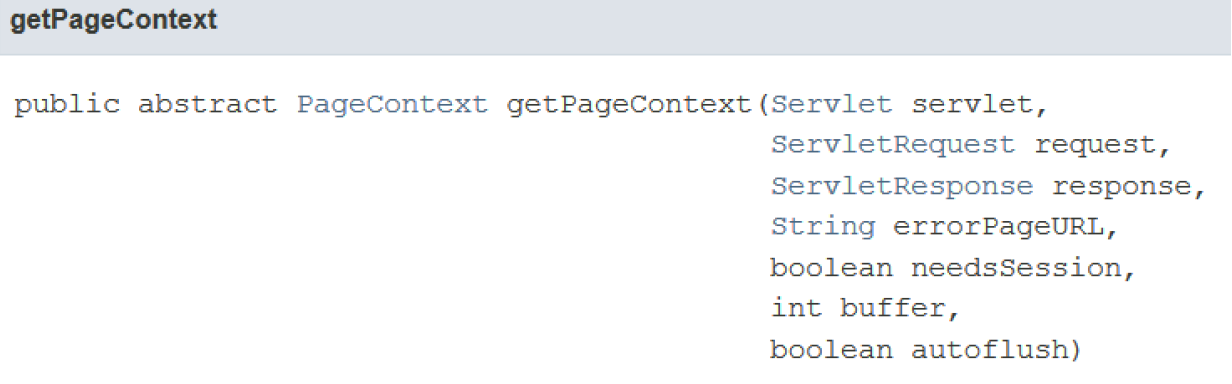
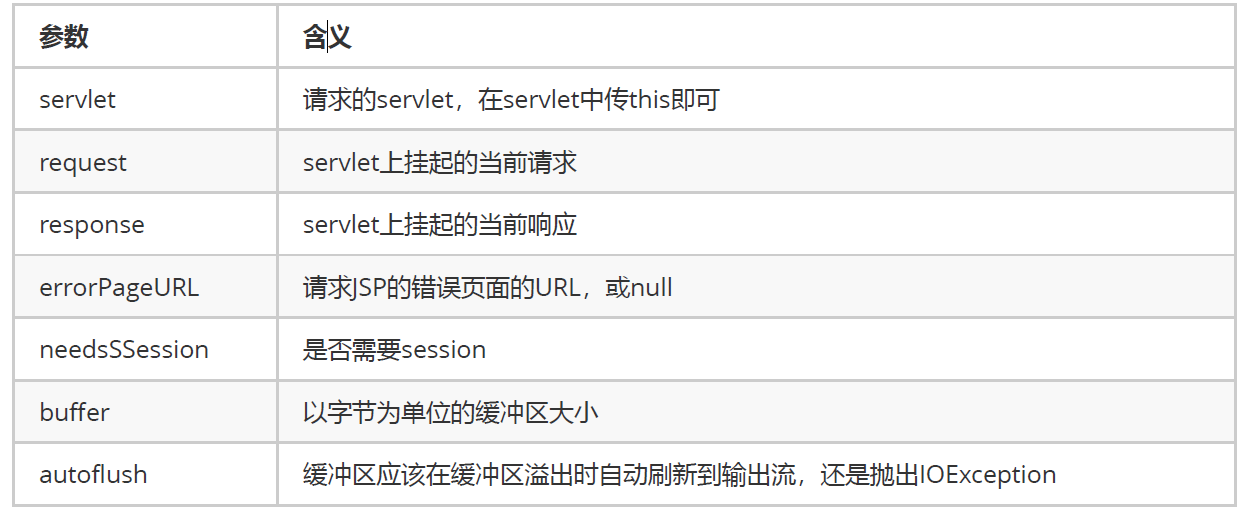
PageContext pageContext = JspFactory.getDefaultFactory().getPageContext(this, req, resp, null, false, 1024, true);
|
||
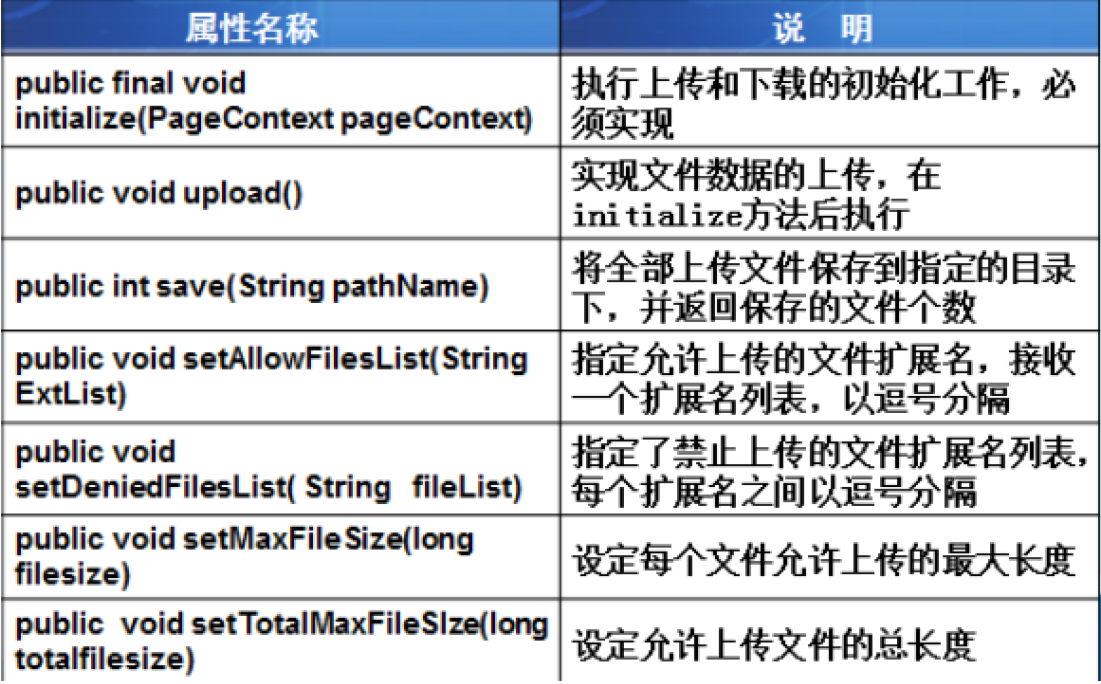
smartUpload.initialize(pageContext);
|
||
//编码
|
||
smartUpload.setCharset("utf-8");
|
||
```
|
||
|
||
> **getPageContext()方法**
|
||
>
|
||
> 
|
||
>
|
||
> 参数的含义
|
||
>
|
||
> 
|
||
|
||
**3.调用SmartUpload对象的upload()方法上传文件**
|
||
|
||
```java
|
||
//文件上传
|
||
try {
|
||
smartUpload.upload();
|
||
} catch (SmartUploadException e) {
|
||
e.printStackTrace();
|
||
}
|
||
```
|
||
|
||
截止目前,文件就被上传到了服务器,但服务器并没有保存
|
||
|
||
**4. 保存文件到指定位置**
|
||
|
||
```java
|
||
/*保存文件*/
|
||
//得到smartUpload对象中文件数组的第1个文件
|
||
File file = smartUpload.getFiles().getFile(0);
|
||
//得到该文件的信息
|
||
String fileName = file.getFileName();
|
||
//指定存储路径
|
||
String path = "uploadfile/"+fileName;
|
||
//存储
|
||
try {
|
||
file.saveAs(path,SmartUpload.SAVE_VIRTUAL);
|
||
} catch (SmartUploadException e) {
|
||
e.printStackTrace();
|
||
}
|
||
```
|
||
|
||
至此,数据文件已经被存放到了某个指定路径下。接下来就可以自己决定如何在前端显示。
|
||
|
||
> `public void saveAs(String path, int optionSaveAs)`
|
||
>
|
||
> 其中,path是另存的文件路径,optionSaveAs是另存的选项,该选项有三值:
|
||
>
|
||
> * SAVEAS_PHYSICAL表明以操作系统的根目录为文件根目录另存文件,
|
||
> * SAVEAS_VIRTUAL表明以Web应用程序的根目录为文件根目录另存文件,
|
||
> * SAVEAS_AUTO则表示让组件决定,
|
||
>
|
||
> 当Web应用程序的根目录存在另存文件的目录时,它默认会选择SAVEAS_VIRTUAL,否则会选择SAVEAS_PHYSICAL。
|
||
|
||
> smartupload常用方法
|
||
>
|
||
> 
|
||
|
||
> smaryupload中文文档:
|
||
>
|
||
> [https://www.cnblogs.com/mycodelife/archive/2009/04/26/1444132.html](https://www.cnblogs.com/mycodelife/archive/2009/04/26/1444132.html) |